> For the complete documentation index, see [llms.txt](https://ntgm.gitbook.io/docs/llms.txt). Markdown versions of documentation pages are available by appending `.md` to page URLs; this page is available as [Markdown](https://ntgm.gitbook.io/docs/i/ruby.md).

# 作品投稿時に使える記法

## ルビを振るには

ルビを振りたい部分の始まりを**全角の縦棒「｜」**&#x3067;指定し、ルビを**全角の括弧（　）**&#x3067;指定します。

{% code title="例１" %}

```
｜遠山（とおやま）に日の当たりたる｜枯野（かれの）かな
```

{% endcode %}

<div align="left"><img src="/files/-LnXjmd-_1c2xXRADHVG" alt=""></div>

{% code title="例２" %}

```
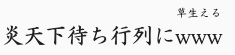
炎天下待ち行列に｜www（草生える）
```

{% endcode %}

<div align="left"><img src="/files/-LnXjzcZeNfItrStlkYH" alt=""></div>

### ルビに関する注意事項

* ルビ中でさらにルビを振ることはできません。
* 全角の縦棒「｜」のあとで、ルビでない普通の（　　）を書きたい場合は、「（」の直前にもうひとつ全角の縦棒「｜」を入れてください。
* ルビを含む作品の中に、ほかに（　　）や「｜」を入れると意図通りに動作しないことがあります。

## 前書きをつけるには

作品の冒頭に、**全角の括弧で二重に囲んだ部分（（　　））**&#x304C;前書きとなります。

{% code title="例" %}

```
（（母上の詞自ら句になりて））毎年よ彼岸の入に寒いのは
```

{% endcode %}

![](/files/8hUYFWDUqU0952qPKdPY)

「ルビの書き方」と組み合わせて、前書き中にルビを振ることも可能です。

なお、作品自体を二重括弧で囲んで始めたい場合（前書きにしたくない場合）は、最初に全角の縦棒を挿入して「｜（（」から書き始めてください。


---

# Agent Instructions
This documentation is published with GitBook. GitBook is the documentation platform designed so that both humans and AI agents can read, navigate, and reason over technical content effectively. Learn more at gitbook.com.

## Querying This Documentation
If you need additional information that is not directly available in this page, you can query the documentation dynamically by asking a question.

Perform an HTTP GET request on the current page URL with the `ask` query parameter, and the optional `goal` query parameter:

```
GET https://ntgm.gitbook.io/docs/i/ruby.md?ask=<question>&goal=<endgoal>
```

`ask` is the immediate question: it should be specific, self-contained, and written in natural language.
`goal` is optional and describes the broader end goal you are ultimately trying to accomplish on behalf of the user. GitBook uses it to tailor the answer towards what is most useful for that goal.

The response will contain a direct answer to the question and relevant excerpts and sources from the documentation.

Use this mechanism when the answer is not explicitly present in the current page, you need clarification or additional context, or you want to retrieve related documentation sections.